FeaturesWP CloudPricingEE CLIContactMy Account
Features
Team Access & User Permissions
Install
Resources
Community
CLEAR
 Tutorials CDN Amazon Cloudfront CDN with W3 Total Cache WordPress
Topics
On this page
-
- Getting Started
- Git and File-System Layout (non-default setup)
- Version Constraints
- Managing Themes and Plugins (for entire WordPress site)
- Updating Themes and Plugins (for entire WordPress site)
- Adding Composer Support to Your Own Themes and Plugins (for developers)
- Using Composer to Manage Own Theme/Plugin Dependencies (for developers)
-
- Assigning Multiple IP Addresses to Single LAN Card
- Disable IPv6 on Ubuntu 12.04
- dsh – distributed shell
- fdupes – find & replace duplicate files with hardlinks
- GPG Keys Cheatsheet
- Increase "Open Files Limit"
- kill all php, nginx, mysql or any kind of processes
- Passwordless Authentication for SSH
- Screen
- search replace in multiple files useing grep xargs sed
- Setup sftp
- sysctl.conf
- Timezone Sync
- Using Google Public DNS on Ubuntu Server
- Using openssl to match private key, cerificate and CSR
- Configure Postfix to Use Gmail SMTP on Ubuntu
- Logrotate Example for Custom Logs
- PHP 5.5, MySQL, Postfix, Nginx and WordPress on Ubuntu
- Serverdensity
- Upgrade Ubuntu 10.04 to 12.04
- Using find and sed to replace strings in multiple files
- Webmin
-
- .my.cnf – mysql user & password
- Analyse slow-query-log using Anemometer
- Improving MySQL Query Cache
- MySQL Query Profiling
- Reset MySQL root password
- tuning-primer.sh – an alternative for mysqltuner
- Using MariaDB 10
- Install/Upgrade to MySQL 5.6 on Ubuntu 12.04 LTS
- Change WordPress Domain Name
- Character Sets and Collations
- Enable innodb_file_per_table
- Enable Remote Access (Grant)
- Installing Percona Toolkit
- Using tmpfs for temporary folder creation
- YARPP and InnoDB
- Convert MyISAM to InnoDB
- Using tmpfs for mysqldump & mysqlimport
- Convert from INNODB to MYISAM
- Analyse slow-query-log using mysqldumpslow & pt-query-digest
- mysqlcheck with cron to optimize automatically
- Using MySQLTuner to Optimize MySQL configuration
-
-
- Directly connect to PHP-FPM
- Generating core-dump for php5-fpm
- GeoIP
- Having php5 and php7 on same system.
- Install Xdebug and configure it with webgrind
- Installation of PHP Code Review Tools
- memcache
- PHP's Zend Opcache Config & Web Viewer
- Setting Sqlite support with PHP
- Using HHVM with PHP-FPM Fallback
- Using Redis for PHP Sessions on Ubuntu Server
- Installing PhpMyAdmin Quickly
- Moving PHP's session storage to tmpfs
- Install Xdebug and configure it with Netbeans
- Nginx – Enable PHP-FPM Status Page
- PHP-FPM: Socket vs TCP/IP and sysctl tweaking
- APC Cache Optimization & Monitoring Using Web Interface
- Checking if PHP/WordPress can send mails
- Debugging PHP Scripts Using slow_log and more
- Increase file upload size limit in PHP-Nginx
- Increase PHP script execution time with Nginx
-
- Performance Optimization
- Remove Query string of css/js files
- Setup ElasticSearch with ElasticPress
- Using Redis for WordPress Object-Cache
- WooCommerce Window Shopping Caching Technique
- Moving WordPress To New Server (Faster)
- Better wp-cron using linux's crontab
- 404 error- Page not Found!!!
- Debugging WordPress with Nginx
This is 2-step process:
Creating Amazon Cloudfront Distribution to be used as CDN for WordPress
CloudFront Distribution List
Configuring W3 Total Cache to use Amazon Cloudfront Distribution
Update:
Amazon Cloudfront CDN with W3 Total Cache WordPress
W3 Total Cache is my favorite plugin when it comes to configuring CDN with WordPress. I already posted how to configure MaxCDN with W3 Total Cache almost 2-years back.
Today I will show you how to configure Amazon Cloudfront CDN using W3 Total Cache as a “generic” origin-pull mirror.
This is 2-step process:
- Creating Amazon Cloudfront Distribution to be used as CDN for WordPress
- Configuring W3 Total Cache to use Amazon Cloudfront Distribution
In between above 2-steps, you can add an extra step to create “white-labelled” CNAME records in case you like to use something like cdn.example.com instead a random subdomain from cloudfront like d3otazh35pn6.cloudfront.net
Creating Amazon Cloudfront Distribution to be used as CDN for WordPress
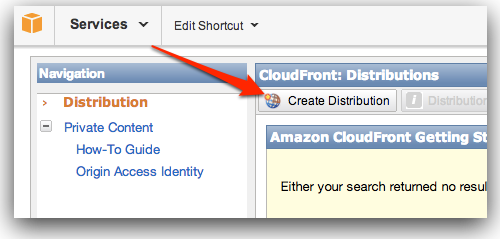
Login to your amazon aws console: https://console.aws.amazon.com/cloudfront/home and click on “Create Distribution” button.
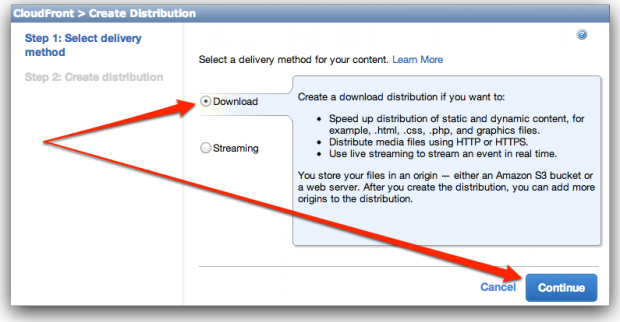
It will start a 2-step process. In Step-1, use delivery method “Download” which is set by default and click “Continue”.
In Step-2, You will be asked different settings for this new Cloudfront distribution.
Under “Origin Settings”, set…
- Origin Domain Name: example.com
- Origin ID: example.com
where example.com is your domain name on which you are running WordPress.
Under “Distribution Settings”…
You can add your one or more CNAMEs to Alternate Domain Names(CNAMEs) setting.
This is optional but if you choose to use custom CNAME record(s), do not forget to configure them on your domain registrar’s end. Instructions for CNAME records are NOT covered in this article.
CloudFront Distribution List
Once you complete setup, this newly created distribution will appear in CloudFront Distribution list.
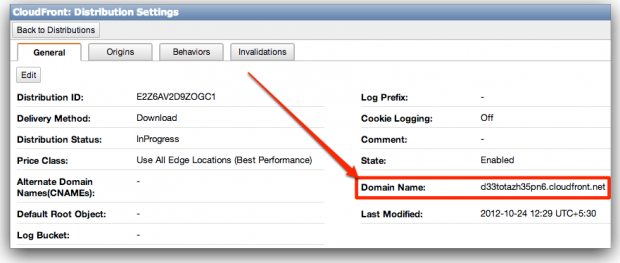
You can see Domain Name value here only which we will need to provide to W3 Total Cache going ahead. This is the value you will also need in case you want to setup your own CNAME records.
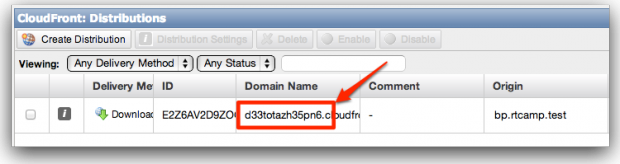
You can see more details and complete domain name value by clicking on info icon.
Configuring W3 Total Cache to use Amazon Cloudfront Distribution
W3 Total Cache provides many options to configure a CDN for your website. For Amazon Cloudfront also, they provide 2 different ways. But we will use “Generic Mirror” option as we have configured CloudFront manually in above steps. You are free to configure Amazon using other ways as well.
Go to W3 Total Cache’s General Settings. Scroll down to CDN section (not submenu)

Select “Generic Mirror” option and click “Save all settings” button.
Then go to W3 Total Cache’s CDN Submenu. Scroll down to Configuration section.
In “Replace site’s hostname with:” field, paste value of your CloudFront Distribution Domain Name. You can also paste value of CNAME if you have configured one already.
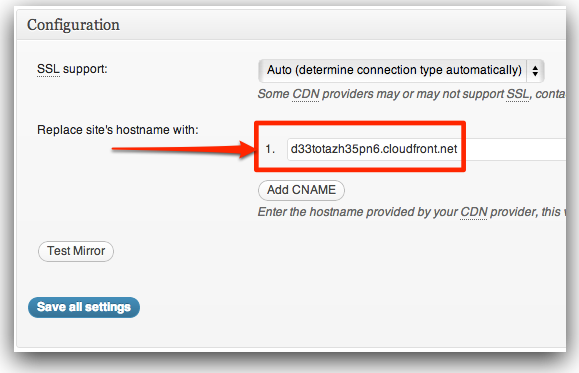
Next, click “Test Mirror” button. If you get positive response, click “Save all settings” button to save changes.
Finally, clear your page cache. W3 Total Cache will remind you about this. But this time you shouldn’t ignore it!
If you stuck/need help, feel free to use comment form below! 😉
Update:
Many users asked why we are using Generic Mirror when Amazon CloudFront option is already in dropdown menu.
On many occasions, Amazon CloudFront option did not work for us. Though, it that option works for you. Please use it. Most likely, using Amazon CloudFront way will purge your CDN cache automatically from WordPress dashboard. BUT, Amazon CloudFront charges for cache-purge also. So accidental and unnecessary purges will increase you bill.
This billing aspect is another reason, we did not think bother to try harder to get Amazon CloudFront option working for us.
Related: Using MaxCDN with W3 Total Cache
CDN.NET Configuration with W3 Total Cache Wordpress
NEXT
Comments
-
rajan anuraj
getting this error:
NoSuchKey
The specified key does not exist.wp-content/uploads/avatars/6831/499807178ba1678eee7d80768cd2dd3a-bpfull.jpg
FEB78DAAF4507115
irMPwIoWJpJ9GXbkT6uVMhlb6CxnfMPuVSll2XbZRA9DWqw7i60C3DB1tDd7+0QH
can you throw some light on this… your help is highly appreciated….
-
@Rajan
Can u share your website and CDN URL?
Is your website public? Do you have any/etc/hostsentry?
Also, are you getting error for one file or every file?Looks like CDN is not pointing to correct origin (website-domain)…
-
-
tom
Thanks very much for this. I just moved all my sites from Maxcdn to Cloudfront today.
-
Hi Tom,
Can you let us know how it is working on budget? Are you saving with Amazon as compared to Maxcdn?
-
-
It seems that W3TC is replacing the entire image path, not just the host name. Any ideas?
-
Can u paste some sample URLs here? Which URL is being replaced by what? And what is expected?
Looks like some error in configuration. W3TC is one of most stable plugin out there (IMHO)
-
-
Avi
Works.
Thanks for the info.
-
Josue
why you chossed a Origin Pull over Origin Pull?
I wanna know which one is best and why.
Thanks
-
I think you wanted to ask – why choose Origin Pull over Origin Push?
My answer to this is – ease of setup. On origin pull, you don’t need to “upload” anything.
Also, Origin Push is generally expensive in terms of pricing.
-
-
seb
yo
when all this is done, how do I sync files with cloudfront? I’ve tested the connection with cloudfront and it says it’s ok but now, i wonder what to do for my filest to be sync with the cdn ??
thanks
Seb
-
You don’t need to sync files manually. I have written about Origin Pull Mode in which CDN copies files on-demand.
-
-
Cristhian
Hi.
If im gonna use Cloudfront. Whats the diference between using (Origin pull) “Generic Mirror” and “Amazon Cloudfront”?At first sight you should think selecting “Amazon Cloudfront” is the obvious way, but insted you are selecting “Generic Mirror”. Why?
Thanx!
-
MacMonkeyMark
I’d be interested in this answer too. I have it set up and working just fine with generic, but I wonder if there are advantages to a specific Cloudfront configuration setting.
-
Emmanuel
Same here, just finished going through this tutorial and first thought was why “generic mirror” .
-
@All
Please check article again. I have added explanation for “Generic Mirror” vs “Amazon CloudFront” part.
Sorry for missing it out earlier.
-
-
-
We have tried both MaxCDN & Cloudfront. And would definitely recommend using Cloudfront
Here is why:
First: Cloudfront is cheaper and because of pay as go billing (For starters & Low Traffic Websites)
Second: With MaxCDN you have to pay an extra $10/Month for Asia Zone which is just not worth it. Especially if you are low to medium traffic website.
Third: With Cloudfront, you can setup as many zones as you want (Good for multiple websites), but with MaxCDN you have to upgrade to Business or custom plan to use on multiple domains.
Fourth: Cloudfront has got servers in Sydney for Australiasia region. Which is what we liked the most…Anyways, that just my opinion… 🙂
-
@Aash
MaxCDN was one of my favorite CDN. I also hate their new pricing strategy and number of website limits per account.
But we are using http://www.cdn77.com/ which has freedom of Cloudfront, only with better pricing. I think they have more number of edge location than Amazon Cloudfront.
-
There is one more provider – http://cdn.net/
cdn.net is backed by big guys but their customer support is worst and software interface is confusing. They are cheapest so we are using them for a very big site which consumes more than 1TB every month.
-
-
Hi Rahul, I am using Amazon Cloudfront and also using W3 total but not configured them to work together. However you post is really good and helpful. Thanks for sharing.
-
If you are already using two, it will be good to use them together. CDN can help in many ways.
-
-
Rishi
Hi – I am using cloudfront along with CNAME & w3 total cache and everything is working fine –
mydomain.com (Main Site)
cdn.mydomain.com (CloudFront)Both the versions are fully functional. Since it might create duplicate content issue on google search i just want to load image/js files from the cdn.mydomain.com and not the entire site from cdn.mydomain.com.
Is there a way to handle this? Temporarily i have used rel=canonical which will prevent duplicate issue.Please let me know
-
rel=canonicalis recommended and I think only way unless CDN provider add some option to choose which content can be served using CDN.pull-cdn is basically a distributed-proxy in-front of original server. So any page on original site will be accessible using CDN.
-
-
Thanks Rahul for the article.
I have been testing both Maxcdn and Amazon Cloudfront with the pull option.
Amazon Cloudfront works very well with one of my sites, but with my other blog Amazon Cloudfront doesn’t pull the images from my Nextgen Galleries.
I think it has to do with the fact that my blog is in a subdirectory. for instance: mysite. com/blog
Isn’t it possible to get a CDN to work with a subdirectory?
Thanks.Johanna
-
@Johanna
Sorry for late reply. If issue is with nextgen gallery only, then its better to talk to its developer.
If nextgen is not using WordPress-Media Library API, then its content may not be get accessible over CDN-pull method.
-
-
Vasu Garg
Hey Rahul, thanks for this wonderful guide, but I am confused what to choose among’st MaxCDN and Amazon? Since my primary traffic originates from India, I should consider a pull CDN service with an edge location in India.
I had used MaxCDN earlier, they are no doubt one of the most reliable and easy to use system but, they have only one edge location in Asia and that’s also in Singapore (Higher latency) while, Amazon has just setup two new edge locations in India, Mumbai and Chennai (Even lower latency). Now, what should I opt for out of these two? and which one will be more affordable? MaxCDN is charging roughly $170 for a year with asian edge location selected, and I have no clue about Amazon!
P.S. my site is already hosted in India.
-
MaxCDN is really ripping off customers. That is why we stopped recommending them.
You can try cdn77.com and cdn.net – both has India edge location and both charges slightly higher for traffic to Indian location.
cdn.net is more flexible in terms of pricing per location.
-
-
Hi rahul,
I am getting an error when trying to update my cname record in w3 total cache dk5nvpm2usf7b.cloudfront.net
this is the url of cloudfront and it is working correctly now.The error that i get is “empty hostname”..
-
You can ignore that error and proceed.
I have seen that error many times even when everything is working correctly. May be w3-total-cache validation code has a bug.
-
-
vijay
I tried many times, also cleared the cache, yet when i click on test mirror..it just shows ‘testing…’ and there are no results. I mean it is stuck at this point. What could be the error?
-
You can ignore testing procedure from w3-total-cache.
Open CDN domain directly in browser. If you can see your origin-site, then its working correctly.
-
-
Amar
Hi,
I am hosting my images in outside word press installation. place of my image is public_html/pics. With your tutorial I have set up everything perfectly. Under CDN pull I am using Amazon cloud front. After enabling CDN images hosted in pics folder is not showing. Adding Cname also did not work. -
Harsha
Hi Rahul,
Thanks for the wonderful and useful article. I have used maxcdn for about a month and they were fine. But shifted to cloudfront recently. I am ok with those ugly urls and dont want to use Cnames, will it effect SEO? And With cloudfront will there be duplicate content issues and if so, How can i prevent that. In maxcdn there is a simple option of adding robots.txt. Any help would be appreciated. Thanks in advance.-
I don’t think CNAME will affect SEO. I never did anything to remove duplicate contents or disallow CDN crawling.
But I am using WordPress-SEO by Yoast plugin and I think using “rel=canonical” is enough to prevent duplicate content.
As an example, check HTML source for http://cdn.rtcamp.com/ and you will see rel=”canonical” there.You can also Google for pages indexed from your CDN domain using “site:cdn.example.com” query as search input. If you see duplicate content there, please let me know. We will see how we can debug it!
-
-
BIju Subhash
Hi,
I have a problem with CDN. Its replacing my all external urls with CName. So its throwing error. The url are just like “cname”/wp-content/uploads/20131/10/”
Kindly please help me on this problem. How can I resolve this issue.
Thanks in advance.-
Please post clearly (a) original url (b) cdn url (wrong one) & (c) expected url.
-
-
Is there any way to test if you have properly installed the CDN
My cdn is http://d82s70rlf4awh.cloudfront.net and my web is propdental.es
When i use gtmetrix it does not recognizes the cdn and i had followed your instructions on the configuration of the total cache. When i see page codes it seems not to serve the can. is there any way to check if i did it correctly or what am i doing wrong. Thanks-
You need to log into gtmetrix and add CDN domain to your profile. Unless you do that, it cannot figure out which domain to consider as CDN domain.
-
-
Nice article. I was struggling to setup with W3 Total Cache. Amazon’s documentation was too complex. Your article helped me to successfully configure Amazon CloudFront. My site (nearesthomefood.com) is finally faster than before, thanks to your article. I cross checked with http://www.webpagetest.org to confirm it works, and it indeed worked.
-
Hello Rahul,
Will it be possible for you to help us with CDN. Website is eogonline.org, hosted on amazon. We are launching on March 8, 2014. The website is already live! Let me know please.
-
For commercial support, please use http://rtcamp.com/contact
If you have followed article and facing issue, you can try our free support forum at – https://rtcamp.com/support/forum/wordpress-nginx/
-
-
Thanks Rahul, yeah i finally set up one of my WP site with CDN. This guide is really very easy to follow up.
-
CLuna
Hey so do you recommend CDN77.com or CDN.net? I have a very small blog with WordPress targeted to Mexico and wanted to try out free CDNs like Bluehat for instance but what do you recommend? I still have 3 to 5 secs in page load time… And I am desperate.
I also have doubts with Hostgator which I am working with and have had some probs, but am not sure if they have the issue.
Thanks in advance for your recommendations!!!
-
Both are cheap. Go with CDN.net if you want to pay only for a particular location. Nobody gives control over locations and pricing like them.
For hosting issues, try DigitalOcean with EasyEngine – http://rtcamp.com/easyengine
-
-
Why can I never see the buttons that people tell me to click on in AWS? Everything always sounds so simple but ends up being totally impossible. Their site is a total nightmare and I cannot follow this article one little bit. Even step 1 doesn’t equate to anything I can find on the AWS page you sent me to.
Maybe Max CDN will make more sense?-
Any CDN will make sense.
-


Features
- Server Setup & Management
- Site Creation & Management
- Create WP Cloud Sites
- Speed & Caching
- Firewall Protection
- Backups & Recovery
- Logs & Monitoring
- Deployments & Developer Tools
- Team Access & User Permissions
Useful Links
Product
Other Products
Subscribe for curated product updates, tips, and announcements.
"*" indicates required fields
This field is for validation purposes and should be left unchanged.
Email*
SIGN ME UP
Δ
© rtCamp, since 2009. All rights reserved.