FeaturesWP CloudPricingEE CLIContactMy Account
Features
Team Access & User Permissions
Install
Resources
Community
CLEAR
 Tutorials Standards PHP Code Sniffer
Topics
On this page
-
- Getting Started
- Git and File-System Layout (non-default setup)
- Version Constraints
- Managing Themes and Plugins (for entire WordPress site)
- Updating Themes and Plugins (for entire WordPress site)
- Adding Composer Support to Your Own Themes and Plugins (for developers)
- Using Composer to Manage Own Theme/Plugin Dependencies (for developers)
-
- Assigning Multiple IP Addresses to Single LAN Card
- Disable IPv6 on Ubuntu 12.04
- dsh – distributed shell
- fdupes – find & replace duplicate files with hardlinks
- GPG Keys Cheatsheet
- Increase "Open Files Limit"
- kill all php, nginx, mysql or any kind of processes
- Passwordless Authentication for SSH
- Screen
- search replace in multiple files useing grep xargs sed
- Setup sftp
- sysctl.conf
- Timezone Sync
- Using Google Public DNS on Ubuntu Server
- Using openssl to match private key, cerificate and CSR
- Configure Postfix to Use Gmail SMTP on Ubuntu
- Logrotate Example for Custom Logs
- PHP 5.5, MySQL, Postfix, Nginx and WordPress on Ubuntu
- Serverdensity
- Upgrade Ubuntu 10.04 to 12.04
- Using find and sed to replace strings in multiple files
- Webmin
-
- .my.cnf – mysql user & password
- Analyse slow-query-log using Anemometer
- Improving MySQL Query Cache
- MySQL Query Profiling
- Reset MySQL root password
- tuning-primer.sh – an alternative for mysqltuner
- Using MariaDB 10
- Install/Upgrade to MySQL 5.6 on Ubuntu 12.04 LTS
- Change WordPress Domain Name
- Character Sets and Collations
- Enable innodb_file_per_table
- Enable Remote Access (Grant)
- Installing Percona Toolkit
- Using tmpfs for temporary folder creation
- YARPP and InnoDB
- Convert MyISAM to InnoDB
- Using tmpfs for mysqldump & mysqlimport
- Convert from INNODB to MYISAM
- Analyse slow-query-log using mysqldumpslow & pt-query-digest
- mysqlcheck with cron to optimize automatically
- Using MySQLTuner to Optimize MySQL configuration
-
-
- Directly connect to PHP-FPM
- Generating core-dump for php5-fpm
- GeoIP
- Having php5 and php7 on same system.
- Install Xdebug and configure it with webgrind
- Installation of PHP Code Review Tools
- memcache
- PHP's Zend Opcache Config & Web Viewer
- Setting Sqlite support with PHP
- Using HHVM with PHP-FPM Fallback
- Using Redis for PHP Sessions on Ubuntu Server
- Installing PhpMyAdmin Quickly
- Moving PHP's session storage to tmpfs
- Install Xdebug and configure it with Netbeans
- Nginx – Enable PHP-FPM Status Page
- PHP-FPM: Socket vs TCP/IP and sysctl tweaking
- APC Cache Optimization & Monitoring Using Web Interface
- Checking if PHP/WordPress can send mails
- Debugging PHP Scripts Using slow_log and more
- Increase file upload size limit in PHP-Nginx
- Increase PHP script execution time with Nginx
-
- Performance Optimization
- Remove Query string of css/js files
- Setup ElasticSearch with ElasticPress
- Using Redis for WordPress Object-Cache
- WooCommerce Window Shopping Caching Technique
- Moving WordPress To New Server (Faster)
- Better wp-cron using linux's crontab
- 404 error- Page not Found!!!
- Debugging WordPress with Nginx
Installing Code Sniffer
On Linux
On Mac (with brew)
On Windows
Installing WordPress Coding Standard
Check available coding standards
Install WordPress Coding Standard
CodeSniffer and NetBeans
Configuring CodeSniffer in NetBeans
Running CodeSniffer in NetBeans
CodeSniffer and GitLab-CI
Installation CodeSniffer on Runner
Configuring GitLab-CI Project
Code Sniffer
PHP Code Sniffer breaks apart in tokens PHP, JavaScript and CSS files and detect violation of coding standards.
Installing Code Sniffer
Let’s start with Installation step and then Netbeans configuration
On Linux
(tested only on Ubuntu)
sudo pear install --alldeps php_codesniffer
On Mac (with brew)
brew install php-code-sniffer
You can install brew by going to http://brew.sh/
On Windows
TODO
Installing WordPress Coding Standard
Check available coding standards
Run following command to check available coding standards by default.
phpcs -i
You will get something like:
The installed coding standards are MySource, PEAR, PHPCS, PSR1, PSR2, Squiz and Zend
You can also find them in filesystem:
cd $(pear config-get php_dir)/PHP/CodeSniffer/Standards/
Install WordPress Coding Standard
We are following these WordPress coding standard – https://github.com/WordPress-Coding-Standards/WordPress-Coding-Standards
You can install it using:
git clone git://github.com/WordPress-Coding-Standards/WordPress-Coding-Standards.git $(pear config-get php_dir)/PHP/CodeSniffer/Standards/WordPress
CodeSniffer and NetBeans
Configuring CodeSniffer in NetBeans
Note: Instructions given below are for NetBeans 7.4+. If you are using older version, please upgrade NetBeans.
Go to Netbeans Tools > Options > PHP
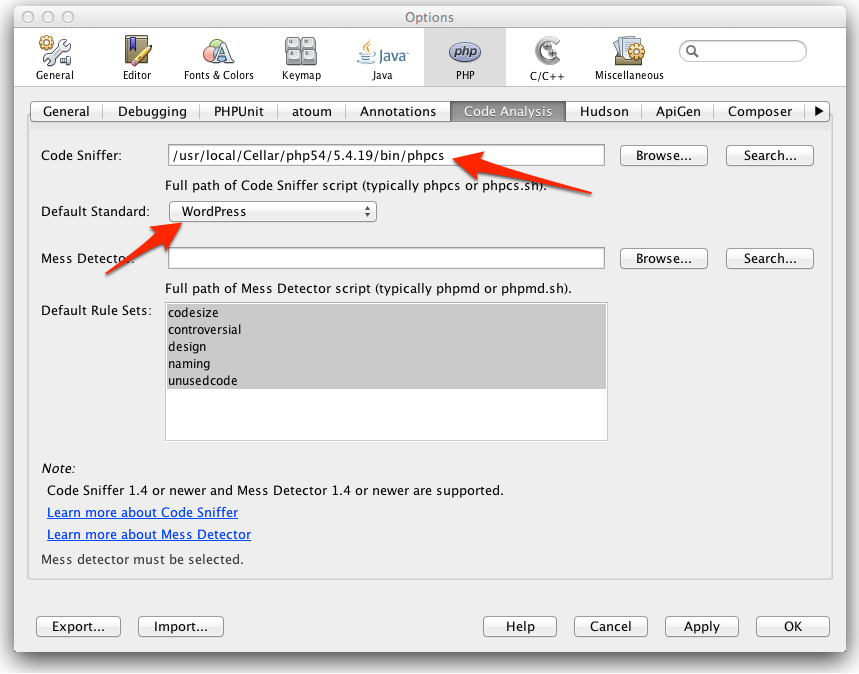
If all goes well you will see something like below in your netbeans output window:

Missing “Code Analysis” option tab
We are using Netbeans 7.4 beta which has “Code Analysis” built in.
For old Net Beans version you can install it from Tools > Plugins .
Just go to “Available Plugins” tab and search for “phpcs”. You will get 2 options. Try both! Or better upgrade to Netbeans 7.4.
Troubleshooting Mac with Brew
This should have been cakewalk. But if you are on mac and using brew it might get tough.
In any case if NetBeans refuse to show you CodeSniffer standards in drop-down menu, please run following:
pear config-show | grep bin_dir
It outputs
PEAR executables directory bin_dir /usr/local/Cellar/php54/5.4.19/bin
Just append phpcs to it so it becomes /usr/local/Cellar/php54/5.4.19/bin/phpcs
Also, you need to use php binary path by brew:
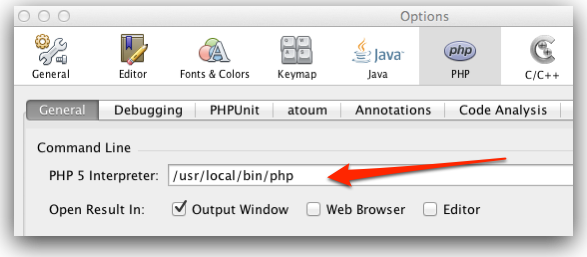
Running CodeSniffer in NetBeans
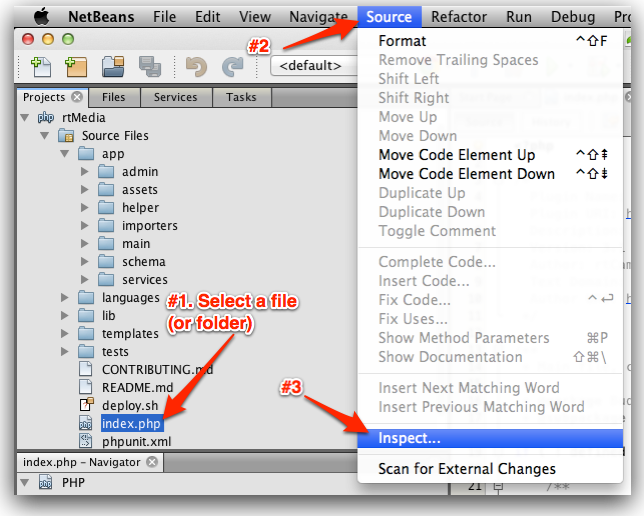
Select a file or a folder. Then click Source >> Inspect Menu.
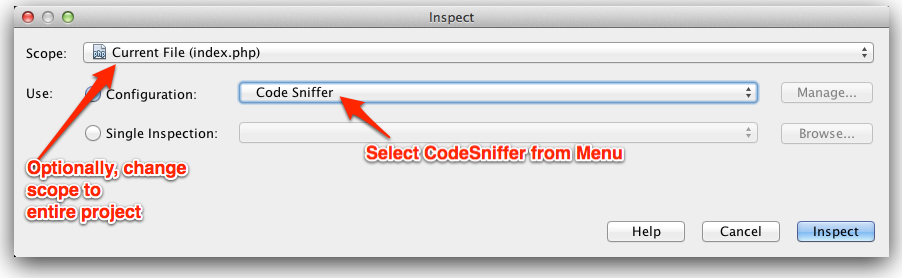
Then select Code Sniffer configuration from drop-down and hit “Inspect” button.
CodeSniffer and GitLab-CI
rtCamp uses GitLab and GitLab-CI to manage its product line.
Installation CodeSniffer on Runner
Installation process will be similar to installing on Linux (assuming you are using Linux to run GItLab-CI Runner).
If you are rtCamper using ci.rtcamp.com, then you can ignore this part as all runners have CodeSniffer already installed.
Configuring GitLab-CI Project
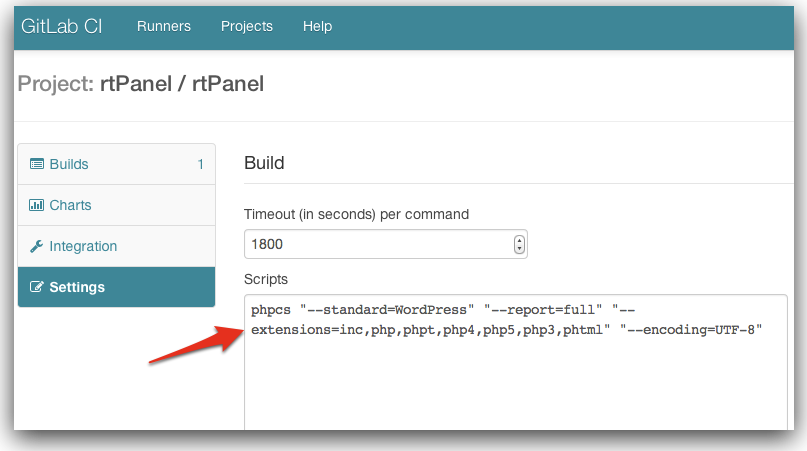
Go to GitLab-CI Project Settings and paste following line in “Scripts” section.
phpcs "--standard=WordPress" "--report=full" "--extensions=inc,php,phpt,php4,php5,php3,phtml" "--encoding=UTF-8"
Screenshot:
Comments
-
Dips
in case pear: command not found :
Try this : sudo apt-get install php-pear

Features
- Server Setup & Management
- Site Creation & Management
- Create WP Cloud Sites
- Speed & Caching
- Firewall Protection
- Backups & Recovery
- Logs & Monitoring
- Deployments & Developer Tools
- Team Access & User Permissions
Useful Links
Product
Other Products
Subscribe for curated product updates, tips, and announcements.
"*" indicates required fields
Company
This field is for validation purposes and should be left unchanged.
Email*
SIGN ME UP
Δ
© rtCamp, since 2009. All rights reserved.
