[Solution] Error – “The site has not been registered” during WordPress Import
John has posted a support request in our free forum asking for solution, following error which he has encountered while using our Blogger To WordPress Redirection User Guide (DIY Tutorial).
The Error Message Was…
The page you have requested cannot be displayed. Another site was requesting access to your Google Account, but sent a malformed request. Please contact the site that you were trying to use when you received this message to inform them of the error. A detailed error message follows:
The site “http://example.com” has not been registered.
Why This Error Occurs:
Google originally built it’s own Google Authentication Service to access Google applications like sites, Google Map, Blogger Account, Analytics, etc. By using the Google Authentication Service is easy to access all the Google services.
Here is the solution:
While importing content from your blogger.com blog to WordPress, we are going to access Google service. For that we need to register your domain (or we can say, just to take permission by “registering” your domain with Google).
Register your domain here https://www.google.com/accounts/ManageDomains to access all other services from Google.
Follow all the steps given below:
- Add your domain name.
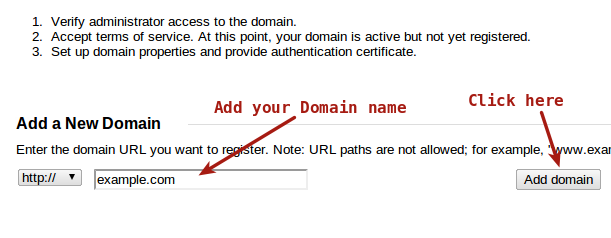
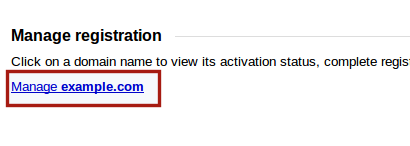
- Click on manage domain name link.
- After that select domain registrar of your domain from drop down menu.
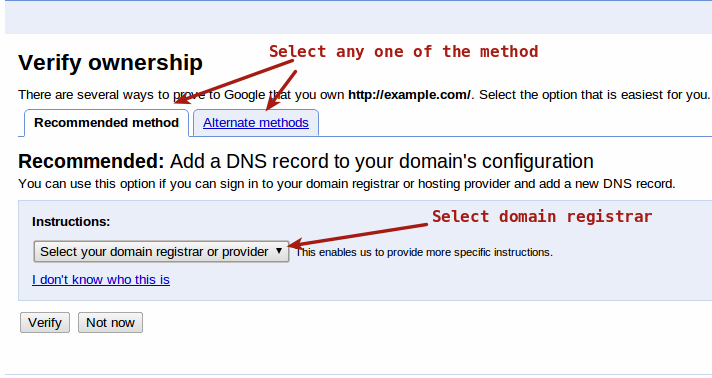
- I prefer to go with Recommended method.
- Add the TXT data into your Domain registrar DNS settings. You can find all the details on the same page.
- Then click on Verify button.
- Add your domain URL and description.
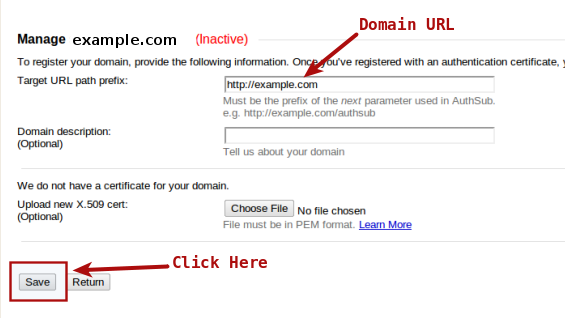
- Click on Save button.
- Now your domain will get active to access Google services.
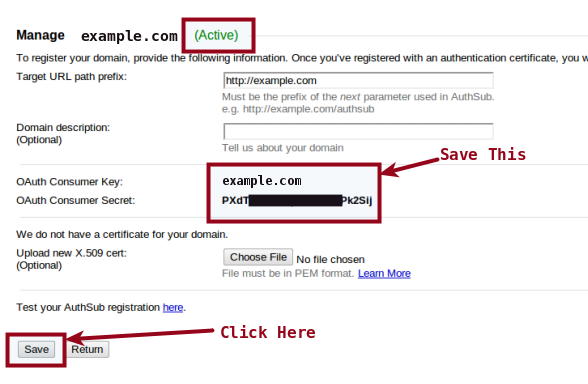
- Save OAuth key and OAuth secrete for your future reference.
- That’s done. You can access Google services in your Domain.
Now you are ready to import content from blogger account to WordPress and follow all the steps of our Blogger To WordPress Migration Tutorial. 🙂
18 responses to “[Solution] Error – “The site has not been registered” during WordPress Import”
-
neo says:
I wish I found this guide earlier! My blogger to wordpress migration should have not taken months to finish. 🙂
Anyway thank you very much for this and your Best Do-It-Yourself (DIY) Blogger to WordPress Migration Guide.
-
Nitun says:
You are welcome Neo 🙂
Enjoy WordPress. Cheers !!
-
-
Thanks a lot again Nitun for all your hard works!
Question though, I’m migrating my other blog and done all process above but now I get this error when trying to import: “AuthSub target path prefix does not match the provided “next” URL. ” you guys have idea to fix this?
-
Hi Neo,
Till now, I only found the above article to get all the Google service and AuthSub issues to be solved. You need to register you new domain for Google services.Thanks,
–Nitun-
Hi Nitun,
By that do you mean register the domain here: https://www.google.com/accounts/ManageDomains? If so I have done same as the steps above. I wonder why it still get that error though.
-
Since you have already registered domain with above link and still getting an error. Unfortunately I am helpless at the moment and I will surely update you, if I find something related to this.
Thanks,
-Nitun-
Hi Nitun,
I found the fix of this problem for me, I’m trying to import from mydomain.com to mydomain.maindomain.com which is a child of my multisite, so to fix I registered mydomain.maindomain.com in google domain accounts instead of the mydomain.com which which I did previously and it worked like a charm.
For other users who still experience the error, just make sure the domain names and links are correct. This can also help..
-
Thats great Neo. I hope this fix will work for others also.
-
-
-
You are most welcome Nitun, thank you also for all your articles and freely helping the community in WordPress Migration. I could have not done my migration tasks without your site guides.
Neo
-
Thanks Neo for your wonderful comments. 🙂
Enjoy WordPress. Cheers!!
-
-
-
-
Holly says:
Thank you! I registered my site with Google. However, now I am getting the following error message when trying to import my blog:
The page you have requested cannot be displayed. Another site was requesting access to your Google Account, but sent a malformed request. Please contact the site that you were trying to use when you received this message to inform them of the error. A detailed error message follows:
AuthSub target path prefix does not match the provided “next” URL.
Any ideas?
-
Sanjeev says:
thanks for the post .. worked like a charm for me .. thanks a ton.
-
You are most welcome Sanjeev. 🙂
-
-
Christopher says:
Worked perfectly with the added advice from Neo. Thank you to both of you!
-
Pankaj says:
Hi Nitun,
I am stuck with the blogger 2 wordpress migration and I need your assistance if you can. That would be great help.
I have a blog at blogspot.com with expertlogic.blogspot.com and I would like to import it to http://obtuz.in which is a self hosted wordpress. I followed all the steps mentioned here and tried to import it but unfortunately I am getting this error again and again. I have mentioned the link where I am getting the error and the error message as well.
Link where error message comes :
accounts.google.com/b/0/AuthSubRequest?scope=http%3A%2F%2Fwww.blogger.com%2Ffeeds%2F&session=1&secure=0&next=http%3A%2F%2Fobtuz.in%2Fwp-admin%2Findex.php%3Fimport%3Dblogger%26noheader%3Dtrue
Error message :
The page you have requested cannot be displayed. Another site was requesting access to your Google Account, but sent a malformed request. Please contact the site that you were trying to use when you received this message to inform them of the error. A detailed error message follows:AuthSub target path prefix does not match the provided “next” URL.
Please suggest.
-
Hi Pankaj,
I hope you followed all the steps mentioned in this article. The Google authentication process might take few minutes / hours to update.
Also follow the steps mentioned in above comments. that would be helpful for you.
Thanks.
-