The client
A global media network delivering news in countries where press freedom is restricted relies on its journalists to bring important news to audiences in challenging environments. Supporting those journalists means giving them access to a unified portal for all educational resources.
Courses sat across separate learning tools behind a two-step login, and editing the site was unreliable for the content team. The academy’s training lead described what she wanted fixed:
“As soon as I try to edit anything, WordPress goes unresponsive and throws me out”
The network wanted the academy on the same platform as its other sites along with a partner it could rely on to keep the technology running so its staff could stay focused on journalism. The network engaged rtCamp, a WordPress VIP Gold agency, to achieve these objectives.
At a glance
ChallengeSolutionOutcomeCourses split across two learning tools behind a WordPress front doorOne LearnDash platform on WordPress VIPOne login, one home for every courseA site on a vendor-held server with unaudited codeA pre-move audit and staged migrationDecision to move to a trusted vendor with no vendor lock-in, and a maintainable foundationLarge course uploads failed on distributed storage, and learner records needed an affordable homeA custom upload handler and an in-database alternativeUploads that just work, about 93% lower licensing costA two-step login, unreliable progress tracking, and broken Cyrillic certificatesA single login, reliable progress, and rebuilt certificatesA platform that’s easy to use day to day
Migrating the Academy to a trusted infrastructure
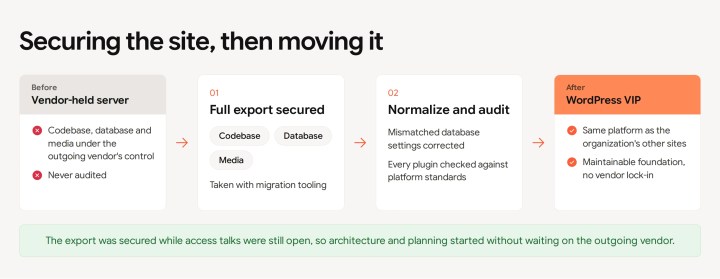
The Academy needed a trusted setup for its new learning platform. Before rtCamp could build it, the site was living on the old vendor’s server, with mismatched database settings and code that had not been audited.
Securing the site before the handover
rtCamp did not wait for a full handover of the existing infrastructure. The team used migration tooling to secure the site’s codebase, database, and core assets, then began architectural analysis and planning while access discussions continued.
Auditing the site and a trial before committing
The team then cleaned up what it had inherited by correcting the mismatched database settings and checked every plugin against WordPress VIP’s quality parameters before the move. Rather than ask the client to take LearnDash on faith, rtCamp deployed a trial site so the academy’s team could try the new system before spending even a dollar on licenses.
With the site safe on the new platform, the goal that had brought the network in came into view: pulling the scattered courses into one place.
Bringing two learning systems into one
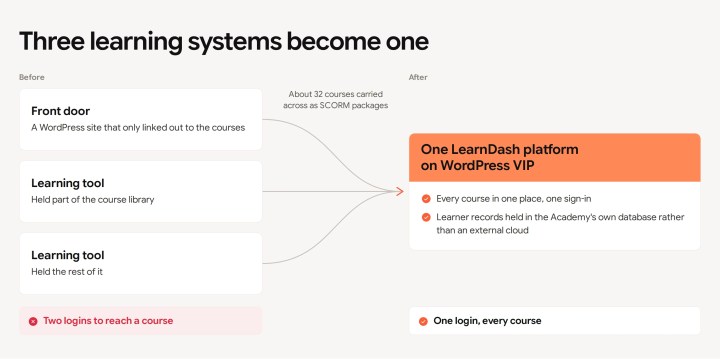
A journalist on the old setup had to know which of several tools held the course they needed. About 32 courses sat across two learning tools, TalentLMS and Instructor LMS, behind a WordPress front door that only linked out to them. The courses themselves were authored in a third tool, Articulate Rise 360.
Rebuilding the Academy on LearnDash
With the Academy team satisfied from the trial, the organization committed to LearnDash, a WordPress learning management system. rtCamp rebuilt the Academy on it and moved the courses across, carrying the Rise 360 content over as SCORM packages, the standard e-learning format, and mapping about 32 of them against a reference sheet that the two teams kept together.
Keeping learner records in-house on a budget
The Academy also needed a way to track learner progress without adding the cost of a separate cloud-based solution. rtCamp suggested Tin Canny, a LearnDash add-on that stores SCORM courses and logs completions. This keeps all data within the Academy’s own database, avoiding an external cloud solution that would have cost several thousand dollars annually.
The WordPress front door and the two learning tools became one platform, with a single sign-in and every course in one place.
Ensuring reliable uploads of large courses
WordPress VIP uses a “distributed object storage model” rather than a traditional server disk to ensure scalability. The Tin Canny plugin, designed for standard file systems, relies on a “folder rename” operation to finalize uploads, a command not supported by this model. This would have been incompatible and would have caused large uploads to fail.
A custom upload plugin for Tin Canny
The Academy needed uploads that worked without a developer on call, so rtCamp built an upload handler that sits alongside Tin Canny rather than modifying its core. The handler adds its own upload button and checks, then hands extraction and placement to a scheduled background task (a cron job) that copies each package into the uploads directory. That path avoids the rename the storage cannot do. Because Tin Canny’s own code stays untouched, the plugin still takes updates.
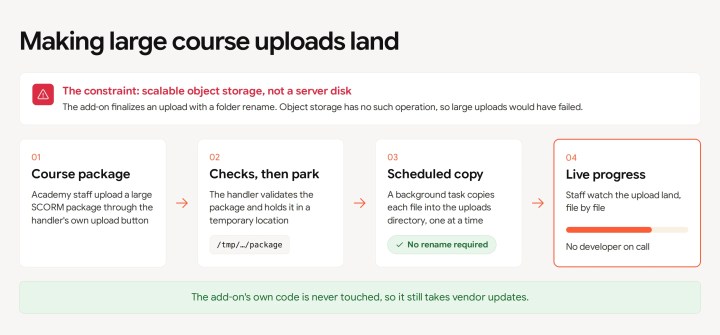
The team also added a real-time progress indicator so academy staff can track large uploads as they land.
With uploads working, attention turned to the people the platform was built for.
Improving the learner’s experience
Three things stood between the learner and a straightforward experience: a two-step login, unreliable course progress tracking, and certificates that could not display Russian-language (Cyrillic) names correctly.
One login through Microsoft accounts
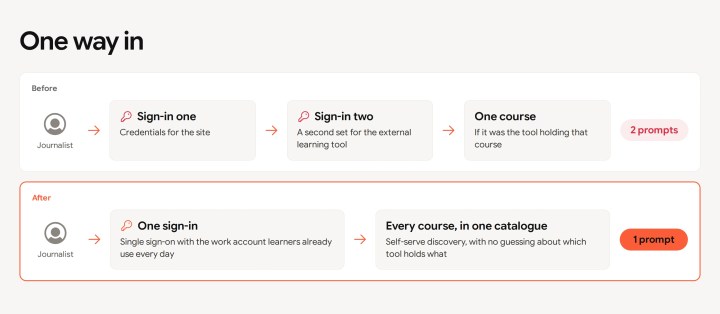
To simplify access across the Academy, rtCamp replaced the two-step login for WordPress and the external learning tool with single sign-on through the learners’ existing Microsoft accounts. Learners now sign in once and reach every course.
Reliable progress tracking and accurate certificate rendering
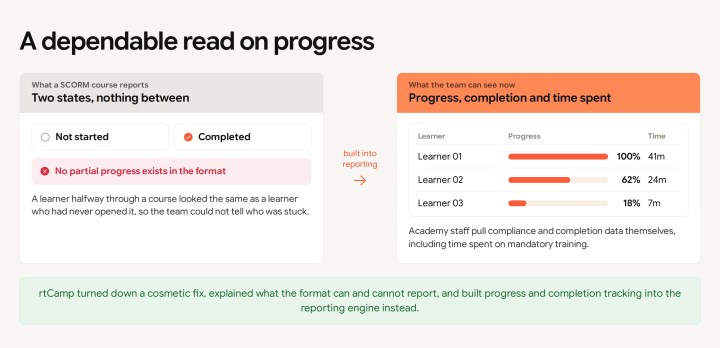
Built in Rise 360 and exported as SCORM packages, the network’s courses only recorded final completion rather than incremental progress. As a result, LearnDash defaulted to displaying a 0% progress bar throughout the course, which instantly spiked to 100% upon completion.
In the network’s internal survey, learners asked for better course progress indicators. To address this, rtCamp replaced the default LearnDash bar with Tin Canny’s tracking bar. This solution monitors active progress within every course, allowing automated reminder emails, previously constrained by the lack of percentage tracking, to be dispatched on a fixed schedule.
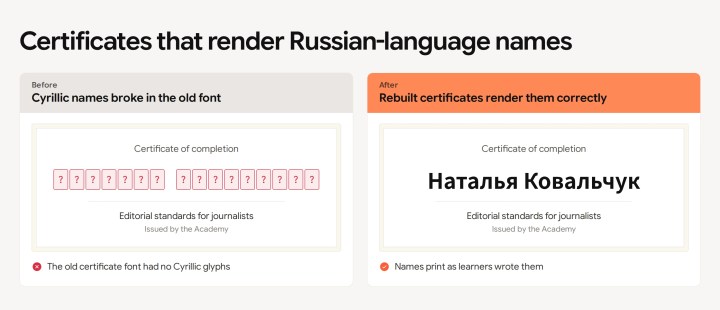
rtCamp also rebuilt the completion certificates to render Cyrillic characters, replacing a font that broke Russian-language names.
Day to day, the Academy has become simpler to use for the learners: one login, self-serve course discovery, a dependable read on progress and completion, and certificates that read right.
Moving thousands of learners over without downtime
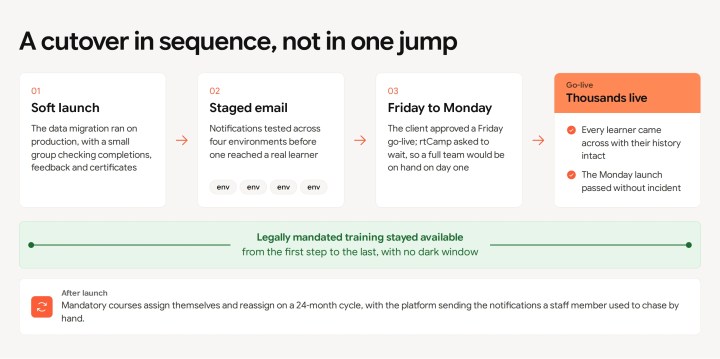
Thousands of journalists depended on the Academy, so the cutover had to be careful. rtCamp sequenced the launch to test each step before the next and kept the legally mandated training live the whole way through.
A soft launch, then a Monday go-live
rtCamp ran a soft launch first, processing the data migration from TalentLMS to LearnDash on production and checking that completions, feedback, and certificates all behaved. The team staged mail delivery across four environments before a single notification reached a real learner.
When the client approved the full go-live on a Friday, rtCamp asked to wait until Monday rather than push thousands of users onto a fresh platform heading into a weekend with nobody on hand to respond. The Monday launch passed without incident.
Mandatory training that stayed live through the move
At go-live, the platform assigned the mandatory training courses on its own, with email notifications: an editorial-standards course and a legally mandated compliance course that had to stay available without interruption through the transition.
Before this, a staff member had to send emails and follow-ups whenever those courses came due. The platform now reassigns both on a 24-month cycle and notifies learners itself.
Continuous improvement after launch
Live use surfaced an issue: completing the feedback form automatically marked the course as complete, regardless of actual course progress. Furthermore, learners who finished all course material without submitting feedback remained stuck as “incomplete.”
rtCamp decoupled the feedback form from course completion and repaired the affected records manually.
With the fix implemented, thousands of learners came across with their history intact, mandatory training stayed live the whole way, and recertification now runs on its own.
From vendor to technical partner
The engagement changed how the client manages its digital presence. rtCamp handles version releases and security patches as an extended web and IT team, so Academy staff are not tied up with day-to-day technical difficulties.
The client then commissioned a second site for a different department, and the relationship with rtCamp has now grown into a long-term partnership.
The project unified the organization’s training on a single platform, and with technical support from rtCamp, its team can stay focused on journalism.
rtCamp helps public-service organizations migrate to WordPress and bring their learning platforms into one. You can reach them here
Related case studies
-
From manual training to self-service: How a workforce nonprofit scaled its statewide student manufacturing contest
Solution
WordPress Development
Industry
Nonprofit
-

The Indian Express : From Code Reviews to Editorial Independence
Solution
WordPress Development
Industry
Publication and Media